
Create Your Perfect Home Workspace
Discover how to design a workspace that keeps your eyes comfortable, your focus sharp, and your productivity high. A comprehensive guide to furniture, lighting, equipment, and smart storage solutions for the modern remote worker.
Quick Setup Tip
Position your monitor at arm's length and slightly below eye level to reduce strain and improve comfort throughout your workday.
Essential Workspace Elements
Every component of your home office plays a role in your eye comfort and productivity. Learn what matters most.
Ergonomic Furniture
Invest in a chair that supports your lumbar spine and a desk at the proper height. When seated, your elbows should be at 90 degrees, and your feet should rest flat on the floor. Proper posture reduces neck and eye strain significantly.
Optimal Lighting
Combine natural daylight with adjustable task lighting. Avoid harsh overhead lights that create screen glare. Aim for 300-500 lux of illumination at your workspace. Position light sources behind or to the side of your monitor.
Quality Equipment
Use a monitor with anti-glare coating and adjustable brightness. Position the top of the screen at or slightly below eye level, about 20-26 inches away. Consider a blue-light filter if you work extended hours on digital screens.
Smart Storage
Organize files, supplies, and equipment within arm's reach but out of direct sight lines. Use vertical shelving to maximize space without cluttering your desk. A tidy workspace reduces visual distraction and mental fatigue.
Regular Eye Breaks
Follow the 20-20-20 rule: every 20 minutes, look at something 20 feet away for 20 seconds. This simple practice reduces digital eye strain. Set phone reminders to help build this habit into your daily routine.
Comfortable Environment
Maintain room temperature between 20–24°C and humidity around 40–60%. Air that is too dry irritates eyes and skin. Proper ventilation and climate control create an environment where your eyes can work comfortably for hours.
Lighting Fundamentals for Eye Comfort
Lighting is one of the most critical factors in reducing eye strain. Your workspace lighting should mimic natural daylight without creating harsh contrasts or glare on your screen.
Layer Your Lighting
Combine ambient, task, and accent lighting to create depth and reduce eye fatigue.
Reduce Glare
Use screen protectors, reposition your desk away from windows, or install blinds to control natural light.
Adjust Color Temperature
Use warmer light (2700K) in evenings and cooler light (4000–5000K) during daytime work hours.
Choose Quality Bulbs
Invest in flicker-free LED bulbs with high color rendering index (CRI 90+) for better visibility.
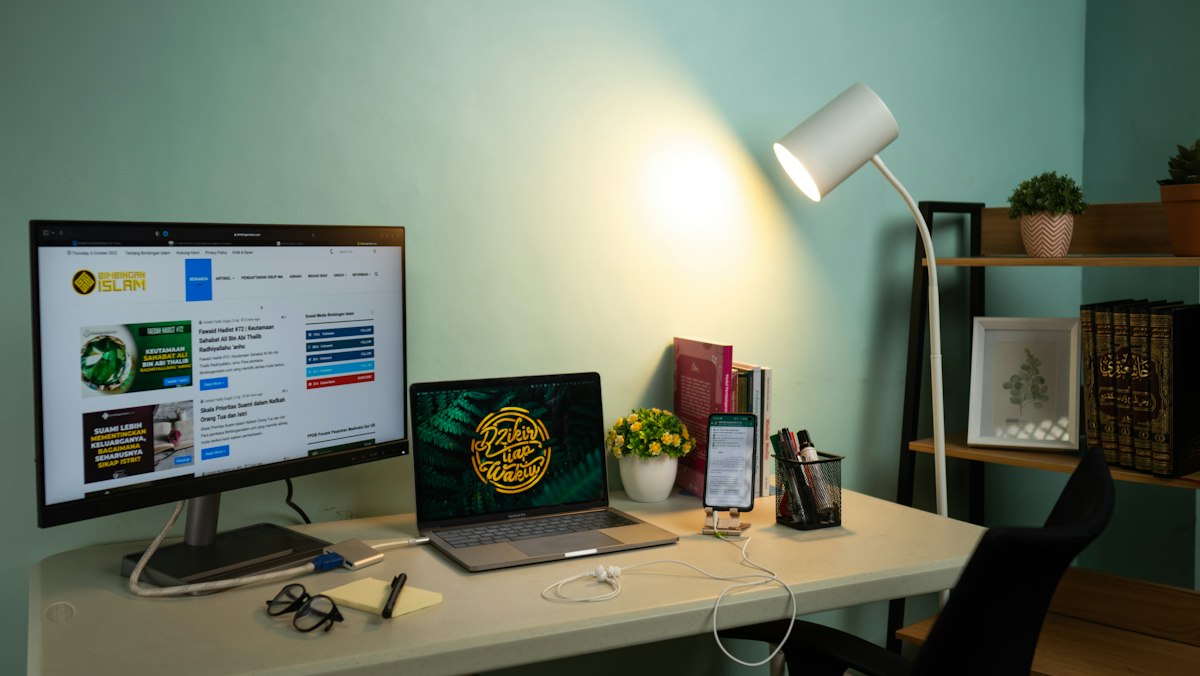
Five-Step Workspace Organization Workflow
Follow this proven process to transform your home office into an efficient, eye-friendly zone.
Assess Your Space
Measure your room, note window placement, and identify natural light sources. Understand your available square footage and electrical outlets. Take photos from different angles to plan furniture placement and identify potential glare problems.
Invest in Core Furniture
Choose a desk that fits your workflow and an ergonomic chair with proper lumbar support. Consider a monitor stand or arm to position your screen at the correct height. Quality furniture is a long-term investment in your health and productivity.
Optimize Lighting Layout
Install layered lighting with a desk lamp for focused work and ambient lighting for the room. Test different bulb temperatures and brightness levels. Adjust your setup throughout the day as natural light changes to maintain consistent comfort.
Organize Storage Systems
Use shelving, filing cabinets, and desk organizers to keep everything within reach. Apply the "one in, one out" rule to prevent clutter accumulation. Keep frequently used items at eye level and less-used items higher or lower on shelves.
Establish Habits & Routines
Set phone reminders for the 20-20-20 rule breaks. End your day with a 5-minute desk cleanup to start fresh tomorrow. Track how your setup affects your energy and eye comfort over a week, then make small adjustments as needed.
Workspace Wellness Benefits
A well-designed home office improves more than just your eyes — it transforms your entire work experience.
Reduced Eye Strain
Proper lighting, monitor positioning, and regular breaks significantly decrease digital eye fatigue and discomfort.
Enhanced Productivity
When your workspace is organized and comfortable, you focus better and accomplish more in less time.
Better Overall Wellness
An ergonomic setup and supportive environment improve posture, reduce headaches, and promote long-term well-being.
What Our Readers Say
People from across the Philippines are transforming their workspaces with our practical guidance.
"I've been working from home for two years, and my eyes were constantly tired by afternoon. After following the lighting recommendations and repositioning my monitor at arm's length, the difference is night and day. I can now work a full eight hours without that nagging eye discomfort. The tips are simple but truly make a difference."
Maria Santos
Manila
"The five-step workflow was exactly what I needed. I wasn't sure where to start with organizing my workspace, but following each step made the process manageable. My office now has proper storage, better lighting, and an ergonomic setup. Best of all, my back pain has lessened and I feel more focused during my workday."
Ramon Reyes
Quezon City
"As a freelancer, I'm at my desk for ten hours some days. The 20-20-20 rule and the lighting tips have been game-changers. I used to get headaches by 6 PM, but now I feel fresh even after a long day. The articles are detailed, easy to follow, and actually address real problems that remote workers face."
Angela Cruz
Cebu City
"I set up my home office during the pandemic and initially had no idea what I was doing. This guide made everything clear — from furniture choices to lighting setup to storage organization. My workspace is now not only functional but actually pleasant to spend time in. I recommend the articles to all my friends who work from home."
Christian Mendoza
Davao City
Common Workspace Questions Answered
Find practical solutions to the challenges remote workers face every day.
The ideal monitor distance is 20 to 26 inches (about arm's length) from your eyes. The top of your screen should be at or just below eye level when sitting in a relaxed position. This positioning reduces neck strain and allows your eyes to view the screen at a slightly downward angle, which is the most natural and comfortable viewing posture.
Stay Updated with Workspace Tips
Get our latest guides and practical advice delivered to your inbox every week.
We respect your privacy. Unsubscribe at any time.
Transform Your Workspace Today
Start with one simple change and build from there. Whether it's adjusting your lighting, repositioning your monitor, or organizing your storage, each improvement brings you closer to the ideal home office.